From Prototype to Production: Optimizing YOLOv8 and SORT for Real-Time Automotive Perception
In a previous blog, I explored the fundamentals of object tracking by implementing the SORT (Simple Online and Realtime Tracking) algorithm. At that stage, the focus was on the tracking logic itself, so I relied on pre-computed detections from the KITTI dataset.
In this post, I have extended that work into a full-stack perception engine. This involves integrating a YOLOv8 object detector with the SORT tracker and applying rigorous optimization techniques to meet production-level performance standards.
The primary challenge in automotive AI is the constant trade-off between latency (how fast the vehicle “sees”) and precision (how accurately it identifies hazards). A high-accuracy model is effectively useless if its inference time exceeds the vehicle’s critical reaction window. This post documents the transition from a “research-grade” prototype to a high-throughput inference engine optimized for modern NVIDIA hardware.
Source code⌗
As usual, the source code is open and available at: GitHub Repo
Table of Contents⌗
Pipeline setup⌗
Ultralytics provides a powerful and easy-to-use implementation of different YOLO models. They integrate seamlessly with Pytorch by wrapping the model in a high-level API. This is excellent for rapid prototyping, the wrapper handles image padding, normalization, and Non-Maximum Suppression (NMS) internally. It also provides a simple interface to export the model to ONNX or TensorRT. In a few lines of code, you can load a pre-trained YOLOv8 model and run inference:
from ultralytics import YOLO
model = YOLO('yolov8n.pt')  # Load a pre-trained YOLOv8 model
results = model.predict(source='image.jpg')  # Run inference on an image
However, the purpose of this project is to learn how to optimize the model for production use, and the intend is that this process might be translated to other models or frameworks. Therefore, I decided to extract the raw Pytorch model from the Ultralytics wrapper and implement the necessary pre-processing and post-processing steps manually.
This involves:
- Preprocessing: Implementing letterbox padding and pixel normalization to ensure the input tensor matches the training distribution.
- Post-processing: Implementing a custom NMS (Non-Maximum Suppression) layer to filter overlapping bounding boxes.
The following snippet shows a compressed version of the pipeline setup (only for object detection):
import torch
import torch.nn.functional as F
import cv2
from ultralytics import YOLO
from torchvision.ops import nms

device = torch.device("cuda" if torch.cuda.is_available() else "cpu")

# Doing .model takes out the ultralytics wrapper and gives us the raw Pytorch model
model = YOLO('yolov8m.pt', verbose=False).model.to(device)

# PRE-PROCESSING
img_bgr = cv2.imread(img_path)
img = torch.from_numpy(img_bgr).to(device).permute(2, 0, 1).unsqueeze(0) # HWC to CHW
h, w = img.shape[2], img.shape[3]  # 375, 1242
pad_h, pad_w = (32 - h % 32) % 32, (32 - w % 32) % 32
img = F.pad(img, (0, pad_w, 0, pad_h), value=0).float() / 255.0  # normalize to [0, 1]
img = img.contiguous()

results = model(img)

# POST-PROCESSING
conf_thres, iou_thres = 0.25, 0.45
prediction = results[0].squeeze().transpose(0, 1) # (1, 84, 9828) -> (9828, 84) for easier indexing
boxes = prediction[:, :4]  # [xc, yc, w, h]
scores = prediction[:, 4:] # [class_scores]
max_scores, class_ids = torch.max(scores, dim=1)
mask = max_scores > conf_thres
boxes, max_scores, class_ids = boxes[mask], max_scores[mask], class_ids[mask]
# Convert [xc, yc, w, h] to [x1, y1, x2, y2]
# (Standard NMS expects top-left and bottom-right corners)
x1 = boxes[:, 0] - boxes[:, 2] / 2
y1 = boxes[:, 1] - boxes[:, 3] / 2
x2 = boxes[:, 0] + boxes[:, 2] / 2
y2 = boxes[:, 1] + boxes[:, 3] / 2
boxes = torch.stack([x1, y1, x2, y2], dim=1)
# Apply Non-Maximum Suppression (NMS)
# We use "Batched NMS" trick: offset boxes by class ID so classes don't suppress each other
offset = class_ids * 4096
indices = nms(boxes + offset.unsqueeze(1), max_scores, iou_thres)
boxes, confidence, class_ids = boxes[indices], max_scores[indices], class_ids[indices]
In the preprocessing stage, we move the image tensor to the GPU immediately to accelerate padding and normalization. Using .contiguous() is vital here; it ensures the tensor is stored in a single memory block, which significantly improves speed when the model, or eventually the TensorRT engine, accesses it.
A note about the output of YOLO, the output tensor has shape (1, 84, 9828) where 84 is the number of classes (80) + 4 (bounding box coordinates + objectness score) and 9828 is the number of predicted candidate anchor detection boxes. Each of these boxes has a set of class scores, and we take the maximum score and corresponding class ID for each box. Then, we filter out boxes with low confidence scores before applying NMS.
The output detection boxes are then send to the SORT tracker for object tracking. I will not cover the SORT implementation here as it is covered in great detail in this previous blog post. The entire perception pipeline is represented in the following diagram:
We put everything together in a single inference script that takes care of loading the model, reading the input video stream, running the detection + tracking pipeline, and visualizing the results. This script is also used to benchmark the different optimization steps described below.
The following gif show a sample output of the perception pipeline running on a video from the KITTI dataset:
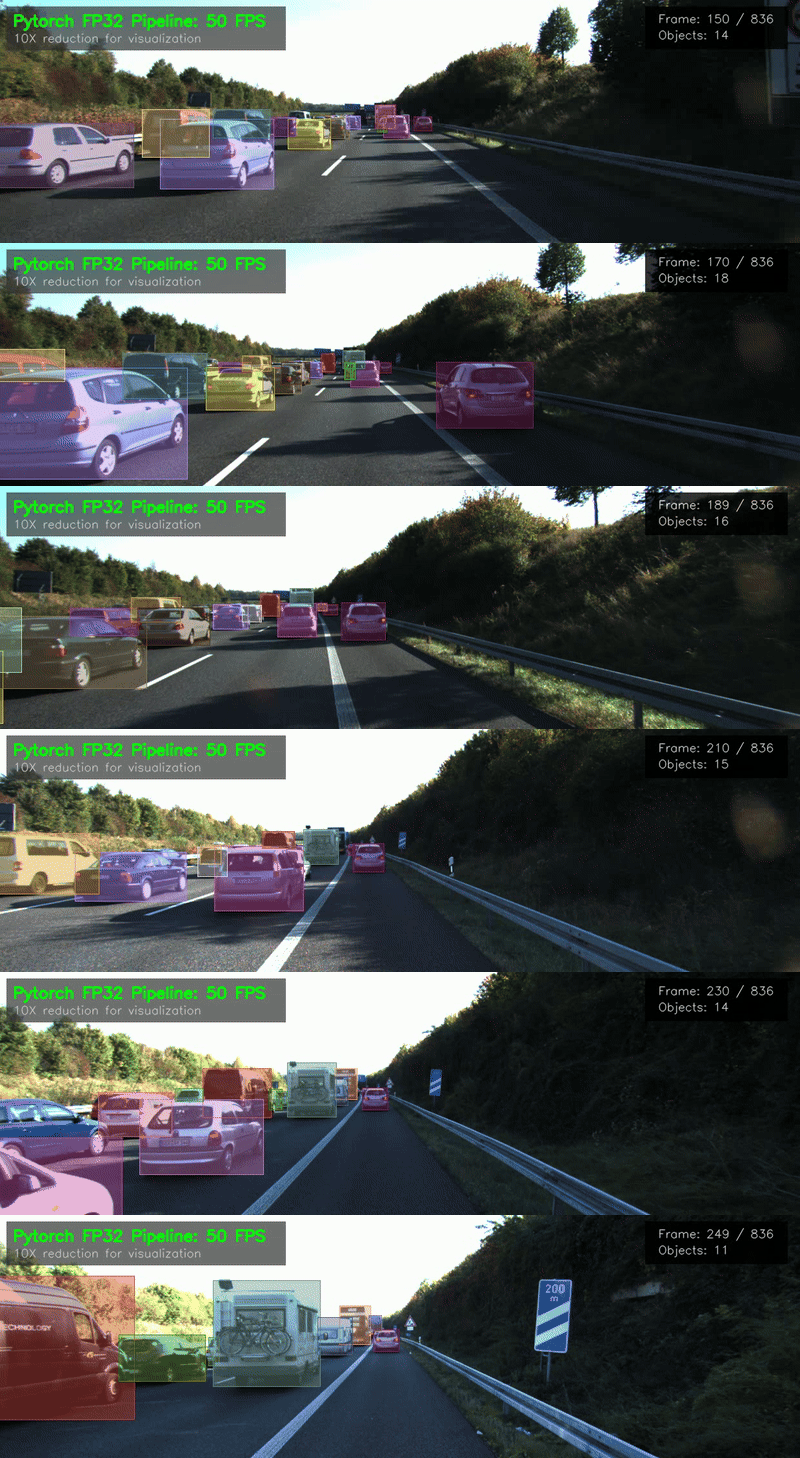
Running this pipeline on an NVIDIA RTX 5050 using the YOLOv8m (medium) model yields a 57 HOTA score on the KITTI tracking dataset at roughly 52 FPS. The detailed breakdown of the average time per step is as follows:
| Step | Avg. Time (ms) | Pct. of total (%) |
|---|---|---|
| Pre-processing | 0.38 | 1.95 |
| YOLOv8 Inference | 15.56 | 80.04 |
| Post-processing | 1.11 | 5.71 |
| SORT Tracking | 2.19 | 11.27 |
| Total | 19.44 (52 FPS) | 100% |
Clearly, the YOLOv8 inference is the bottleneck, consuming 80% of the processing time. This is where we will focus our optimization efforts. In the next sections, we will explore different techniques to improve the inference speed while maintaining tracking performance. Let’s start with quantization.
Quantization⌗
Our model weights currently utilize FP32 (32-bit Floating Point), the standard single-precision format for scientific computing. In this format, 32 bits are divided into 1 bit for the sign, 8 for the exponent, and 23 for the mantissa (significand). This structure provides a vast dynamic range and high precision, offering roughly 7 decimal digits of accuracy.
Machine learning practitioners often wonder if this level of precision is necessary for inference. Generally, it isn’t; deep learning models are remarkably resilient to lower-precision arithmetic. This leads us to quantization: the process of reducing weight precision to accelerate inference and lower memory usage, all while ensuring model performance does not significantly degrade.
In this project, I tested converting weights from FP32 to FP16 (Half Precision). This format reallocates the bit budget to 1 bit for the sign, 5 for the exponent, and 10 for the mantissa. While this limits the range and reduces accuracy to about 3 decimal digits, it is incredibly simple to implement in PyTorch with just a single line of code:
model.half() # Convert model to FP16
The benefits of FP16 are twofold:
Reduced Memory Bandwidth: By using half the bits of FP32, FP16 effectively halves the model’s memory footprint and the bandwidth required to transfer weights to the GPU cores.
Increased Throughput: Modern NVIDIA GPUs include dedicated Tensor Cores that execute FP16 matrix multiplications and convolutions at significantly higher speeds than FP32 operations.
Let’s look at the data. After converting the model to FP16, I re-ran the inference script to measure the FPS and tracking performance. The results are as follows:
| Model | Avg. YOLO Time (ms) | Total Time (ms) | FPS | HOTA Score |
|---|---|---|---|---|
| FP32 | 15.56 | 19.44 | 52 | 57 |
| FP16 | 10.35 | 14.00 | 71 | 57 |
As we can see, it speeds up the YOLOv8 inference time from 15.56 ms to 10.35 ms, resulting in an overall pipeline speed of 71 FPS. The tracking performance remains unchanged at a HOTA score of 57, indicating that the model’s accuracy was preserved despite the reduced precision. Furthermore, memory consumption dropped by roughly 50%, which frees up GPU resources for larger batch sizes or more complex architectures. This is essentially a “free lunch” for performance.
Can we optimize further? Yes, by quantizing the model to INT8 (8-bit Integer) or FP8, though the latter requires modern GPU support. Unlike FP16, this level of quantization involves a more complex workflow called calibration. Because INT8 has a much narrower numerical range than FP16 or FP32, we must calculate optimal scaling factors to map floating-point weights and activations to integers. This process involves passing a representative dataset through the model to gather activation statistics, which are then used to determine the precise scaling required to minimize accuracy loss. This could be the topic of a future post.
TensorRT Optimization⌗
The final and most significant leap in performance was achieved by compiling the model into a TensorRT engine. TensorRT is an entire ecosystem developed by NVIDIA to optimize deep learning models for inference on NVIDIA GPUs. Among other features, TensorRT provides a compiler that takes a trained model (in ONNX format) and generates an optimized runtime engine tailored for specific NVIDIA hardware.
TensorRT compilation⌗
The compilation workflow involves several steps like optimizing the model graph, cleaning up unused nodes, quanitzation and profile in real-time to select the best kernels for the target hardware. Perhaps the most important optimization is layer fusion, where multiple layers are combined into a single operation to reduce memory access and improve computational efficiency. For example, a common fusion is combining a convolution layer followed by a batch normalization layer into a single convolution operation with adjusted weights and biases.
To compile our Pytorch model to TensorRT, we first need to export it to ONNX (Open Neural Network Exchange) format. This can be done using the following code snippet:
from ultralytics import YOLO
from common import KITTI_HEIGHT, KITTI_WIDTH

model = YOLO('yolov8m.pt')
model.export(
    format='onnx',
    device=0,  # GPU device
    imgsz=(KITTI_HEIGHT, KITTI_WIDTH),  # KITTI image size
    half=False # we will use half precision in TensorRT step
)
This will generate a file named yolov8m.onnx in the current directory. Note that we set a static input size matching the KITTI image dimensions (after YOLO padding). TensorRT performs best with fixed input sizes, as this allows it to precisely optimize memory allocation and kernel selection for those specific dimensions.
Once the model is exported to ONNX, we use the TensorRT API to compile it into a runtime engine. After installing TensorRT, the process is as simple as running the following command:
trtexec.exe --onnx=yolov8m.onnx --saveEngine=yolov8m.engine --fp16 --verbose
This command uses the trtexec tool provided by TensorRT to compile the ONNX model into a TensorRT engine file named yolov8m.engine. The --fp16 flag indicates that we want to use FP16 precision for the model weights and activations.
TensorRT inference⌗
After compiling the model, we can load the TensorRT engine and run inference using the TensorRT runtime API. It is not as straightforward as using Pytorch, and involves a series of steps to allocate memory buffers, create execution contexts, and manage data transfers between the CPU and GPU. To streamline this, I developed a wrapper class that abstracts these low-level details, providing a clean interface for running inference.
import torch
import tensorrt as trt

class YOLOv8TensorRT:
    def __init__(self, engine_path, device="cuda"):
        self.device = torch.device(device)
        self.stream = torch.cuda.Stream(device=self.device)

        # 1. Load the Engine and creating execution context
        logger = trt.Logger(trt.Logger.WARNING)
        with open(engine_path, "rb") as f:
            runtime = trt.Runtime(logger)
            self.engine = runtime.deserialize_cuda_engine(f.read())
        self.context = self.engine.create_execution_context()

        # 2. Identify Input/Output Tensors
        self.input_name = self.engine.get_tensor_name(0)
        self.output_name = self.engine.get_tensor_name(1)

        # 3. Allocate GPU buffers using the detected type
        #    it is important here that the output is float32 even if the model is compiled with --fp16
        self.output_shape = self.engine.get_tensor_shape(self.output_name)
        torch_dtype = torch.float32 if self.engine.get_tensor_dtype(self.output_name) == trt.float32 else torch.float16
        self.output_buffer = torch.zeros(tuple(self.output_shape), device=self.device, dtype=torch_dtype)

    def inference(self, input_tensor: torch.Tensor):
        # Use a context manager to ensure all torch kernels are launched in the specified stream
        with torch.cuda.stream(self.stream):
            # Set Tensor Addresses
            self.context.set_tensor_address(self.input_name, input_tensor.data_ptr())
            self.context.set_tensor_address(self.output_name, self.output_buffer.data_ptr())

            # Run Inference using the raw cuda_stream pointer
            self.context.execute_async_v3(self.stream.cuda_stream)

            # Synchronize this stream specifically
            # (Allows CPU to stay ahead of other GPU tasks if needed)
            self.stream.synchronize()

            return self.output_buffer

# Usage Example
trt_model = YOLOv8TensorRT('yolov8m.engine')
results = trt_model.inference(img_tensor)
Ok, so how does it perform? After integrating the TensorRT inference into our perception pipeline, I re-ran the benchmarking script to measure the FPS and tracking performance. The results below compare all versions to highlight the improvements:
| Model | Avg. YOLO Time (ms) | Total Time (ms) | FPS | HOTA Score |
|---|---|---|---|---|
| FP32 | 15.56 | 19.44 | 52 | 57 |
| FP16 | 10.35 | 14.00 | 71 | 57 |
| TensorRT FP16 | 4.11 | 7.87 | 127 | 56 |
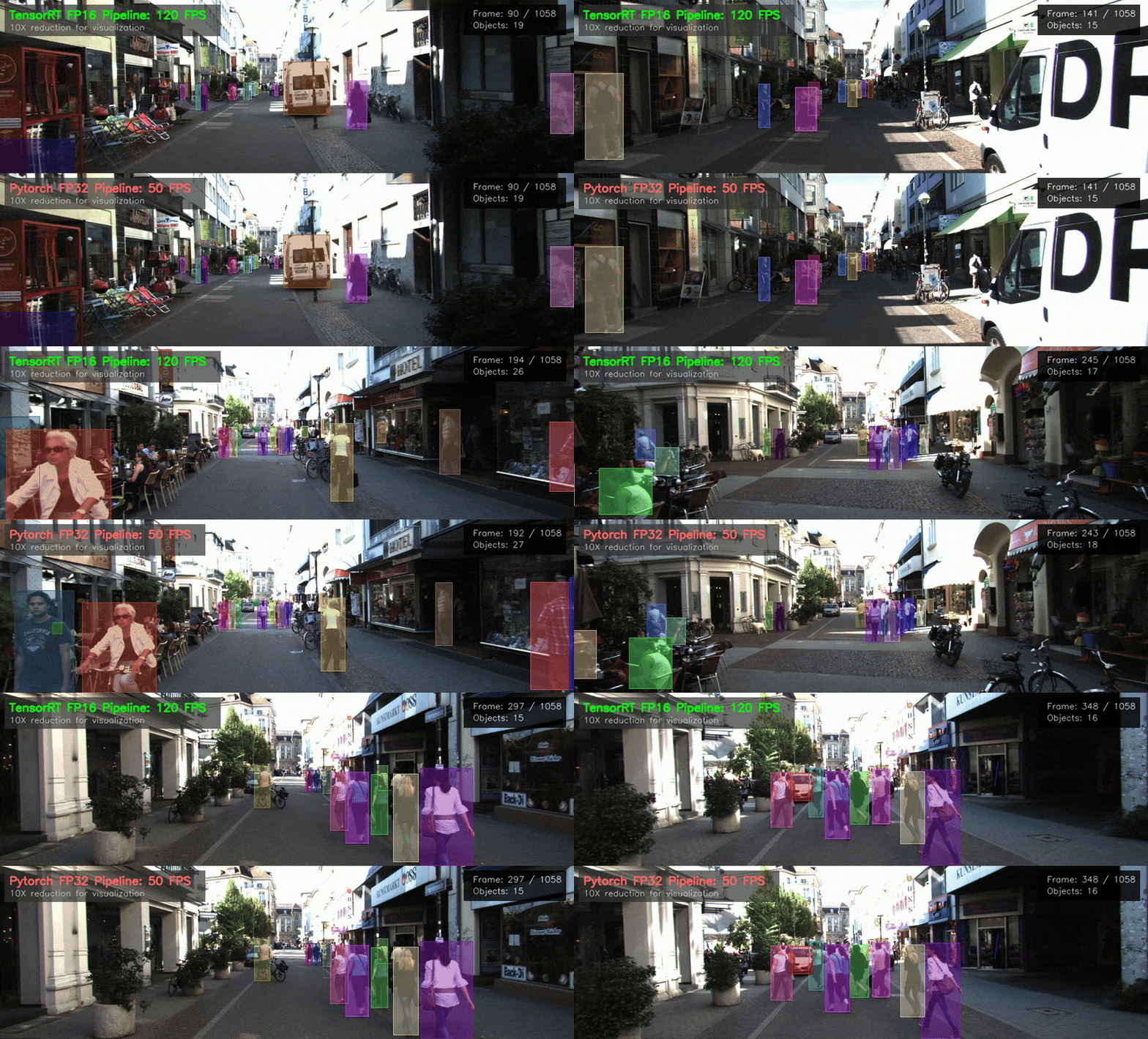
As we can see, the TensorRT-optimized model achieves an average YOLO inference time of just 4.11 ms a ~3.7X compared to our FP32 baseline and an above 2X improvement over the FP16 Pytorch model, resulting in an overall pipeline speed of 127 FPS. The tracking performance remains largely unchanged with a HOTA score of 56, indicating that the optimization did not compromise accuracy.
For the visual comparison, see the following GIF showing the PyTorch FP32 model and the TensorRT FP16 model running side-by-side at their respective frame rates:
Discussion about the results⌗
The absolute numbers showed here should not be taken as definitive benchmarks, as performance can vary significantly based on hardware, software versions, and specific model architectures. In real-world applications, it is likely that this pipeline will run on an edge device, maybe a NVIDIA Jetson or similar, which has different performance characteristics compared to a desktop GPU like the RTX 5050 used here. However, the relative improvements observed through quantization and TensorRT optimization are expected to hold across different hardware platforms and the techniques demonstrated here are widely applicable to various deep learning models beyond YOLOv8.
On the other hand, the small degradation we observe is because we are measuring on the object tracking performance, if instead we measure the object detection performance (mAP), the difference may be greater. This is because the tracker can compensate for small variations in detection accuracy by leveraging temporal information across frames. Therefore, even if the detection performance drops slightly due to quantization or optimization, the overall tracking performance may remain relatively stable. And ultimately, what matters in a perception pipeline is the end-to-end performance.
Conclusions and next steps⌗
This project demonstrates that moving from a research prototype to a production-ready perception engine requires more than just choosing a high-performing model. By taking control of the full pipeline—from manual pre-processing to hardware-specific compilation—we successfully transformed a standard YOLOv8 implementation into a high-throughput engine capable of 127 FPS.
The transition to FP16 precision and the use of TensorRT’s layer fusion proved to be the most impactful steps. These optimizations allowed us to nearly triple our inference speed while maintaining the tracking accuracy necessary for automotive safety.
Future Work⌗
To further evolve this perception stack, the next logical steps involve:
- INT8 Quantization: Implementing Post-Training Quantization (PTQ) with a calibration dataset to further reduce latency on hardware with INT8 support.
- DeepSORT Integration: Replacing the linear motion model of SORT with a Deep Association Metric to improve tracking through long-term occlusions.
- Multi-Class Optimization: Fine-tuning the NMS and tracking parameters specifically for smaller or more frequent classes like pedestrians and cyclists.
- Edge Deployment: Validating these benchmarks on constrained hardware, such as an NVIDIA Jetson Orin, to measure thermal performance and power consumption.